Evaluations
Evaluations in CMND.ai allow you to test and validate your AI assistant's responses against expected behaviors. This feature is essential for ensuring your chatbots consistently meet quality standards before deploying to production.
What are Evaluations?
An evaluation is a structured test scenario that:
- Defines a conversation flow with user messages, assistant responses, and tool interactions
- Specifies expected outcomes for each assistant turn using various evaluation approaches
- Runs automated tests against your chatbot to verify correct behavior
- Tracks results over time so you can monitor quality as your assistant evolves
Key Concepts
Conversation Turns
Each evaluation consists of a series of conversation turns:
| Turn Type | Description |
|---|---|
| SYSTEM | The system prompt that defines your assistant's behavior (read-only, pulled from chatbot) |
| USER | Messages that simulate user input |
| ASSISTANT | Expected or mock assistant responses |
| TOOL_RESPONSE | Tool call results for testing tool-based workflows |
Assistant Turn Modes
Assistant turns can operate in two modes:
- Mock Mode: Define a fixed response that the assistant "would have" given. Useful for testing downstream behavior.
- Evaluation Mode: Test the actual LLM response against specified criteria.
Evaluation Approaches
When in Evaluation mode, you can choose from three approaches:
| Approach | Description | Use Case |
|---|---|---|
| LLM-as-a-Judge | Uses an LLM to evaluate the response against pass/fail criteria | Complex semantic evaluation |
| Exact Match | Checks if the response exactly matches expected text (case-insensitive) | Simple, deterministic responses |
| Regex | Matches the response against a regular expression pattern | Pattern-based validation |
Getting Started
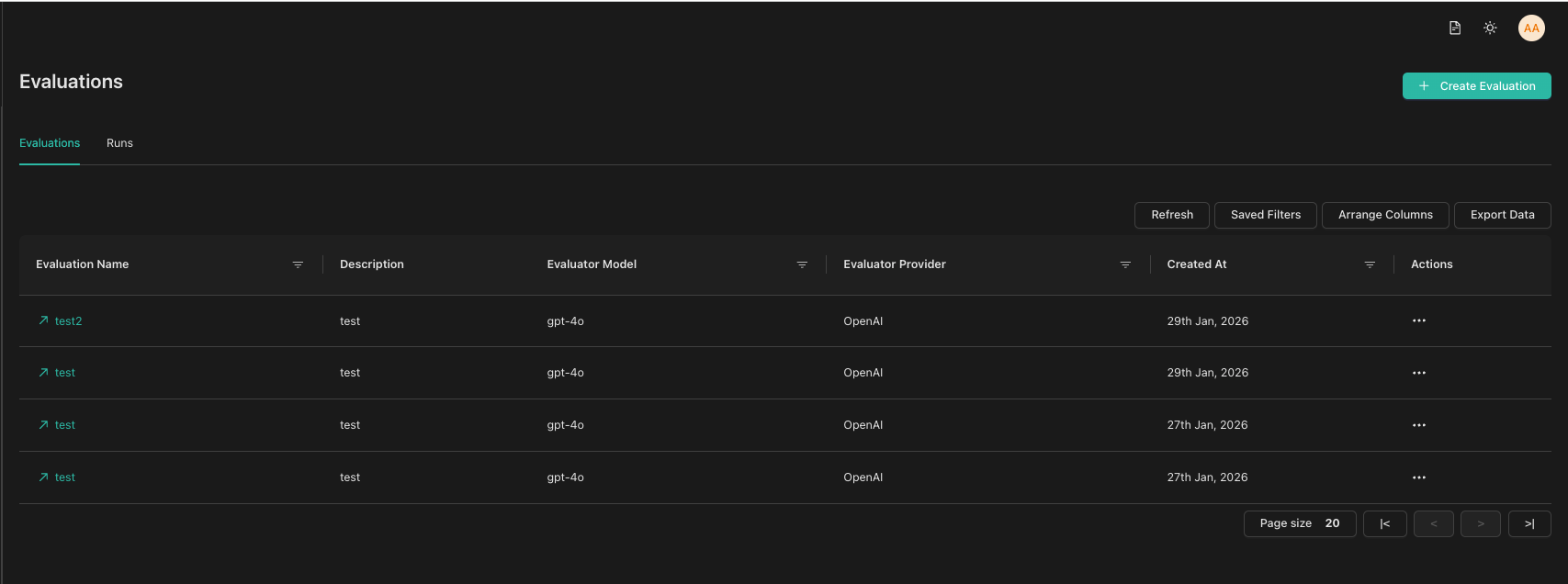
To access Evaluations, navigate to the Evaluations section in the sidebar. You'll see two tabs:
- Evaluations tab: Lists all your evaluations. Click an evaluation name to edit it.
- Runs tab: Shows all test runs across evaluations with filtering options.
Next Steps
- Creating an Evaluation - Learn how to create your first evaluation
- Running Tests - Execute tests and view results
- Converting Conversations - Turn real conversations into test cases